Quickstart
This page takes you from a fresh install to a working reconstructor in about five minutes.
It uses the example configurations shipped in the repository’s examples/benchmark
directory, so clone the repository first:
git clone https://github.com/KeckObservatory/pyTomoAO.git
cd pyTomoAO
pip install .
1. Create a reconstructor object
Every workflow starts by pointing tomographicReconstructor
at a YAML configuration file. The file is parsed and validated immediately, so configuration
errors surface here rather than halfway through a long computation.
from pyTomoAO import example_config
from pyTomoAO.reconstructor import tomographicReconstructor

reconstructor = tomographicReconstructor(example_config("kapa"))
The configuration is split into five parameter objects, each of which pretty-prints itself:
print(reconstructor.atmParams)          # atmosphere: layers, r0, L0, wind
print(reconstructor.lgsAsterismParams)  # guide star asterism geometry
print(reconstructor.lgsWfsParams)       # WFS lenslet array and valid subapertures
print(reconstructor.dmParams)           # actuator grid, pitch, cross-coupling
print(reconstructor.tomoParams)         # optimisation field of view
2. Build the reconstructor
R = reconstructor.build_reconstructor()
print(f"Reconstructor matrix shape: {R.shape}")
With no arguments this builds the model-based reconstructor: it maps WFS slopes to a
reconstructed phase on the pupil grid. Pass an interaction matrix instead
(build_reconstructor(IM)) to build an IM-based reconstructor that maps slopes directly
to DM commands. See Building reconstructors for the trade-offs.
3. Reconstruct a wavefront
Feed the reconstructor a slope vector. Here is a simple tip-tilt pattern replicated across the four KAPA LGS wavefront sensors:
import numpy as np

slopes = np.ones(608)
slopes[:304] = -1
slopes = np.tile(slopes, 4)

wavefront = reconstructor.reconstruct_wavefront(slopes)
fig = reconstructor.visualize_reconstruction(slopes)
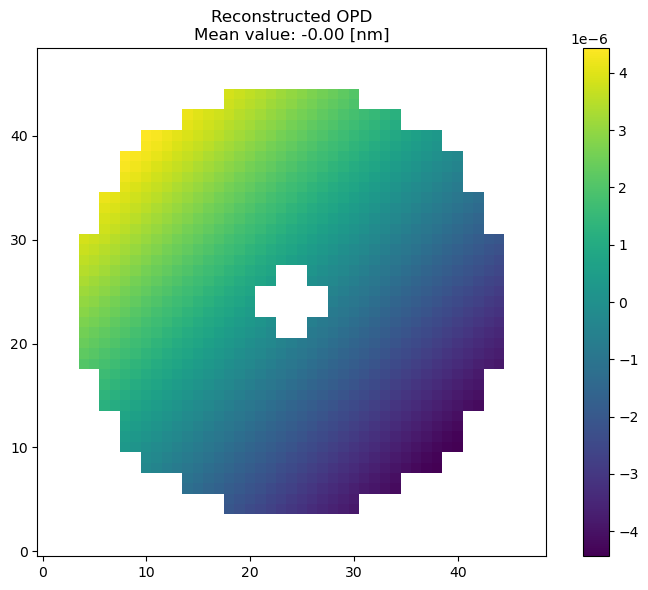
Reconstructed phase for a tip-tilt slope input, model-based reconstructor.
4. Get DM commands
The model-based reconstructor produces a phase map, so a fitting step is needed to project
it onto the deformable mirror. assemble_reconstructor_and_fitting builds the influence
functions, inverts them and folds the result into a single slopes-to-commands matrix FR:
FR = reconstructor.assemble_reconstructor_and_fitting(
    nChannels=4,
    slopesOrder="simu",
    scalingFactor=1.5e7,
)
print(f"Reconstructor + fitting shape: {FR.shape}")

fig = reconstructor.visualize_commands(slopes)
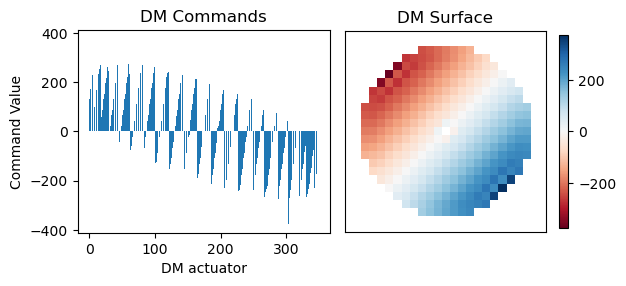
DM commands obtained after the fitting step.
slopesOrder must match how your real-time controller orders its slope vector — "simu",
"keck" or "inverted". Getting it wrong produces a plausible-looking but incorrect
reconstruction, so check it against your system. The options are documented in
DM fitting.
Where to go next
Configuration reference — every key in the YAML file, and what it controls.
Building reconstructors — model-based versus IM-based reconstruction.
An LTAO reconstructor for KAPA — the full KAPA LTAO walkthrough.